

Today’s highly complex shows with many performers, multiple broadcast feeds and demanding monitoring requirements add to the primary task of presenting the audience with the highest quality live and broadcast sound.
DirectOut’s PRODIGY units are more than just sophisticated routers able to handle and convert multiple audio formats. An extensive range of powerful DSP elements also exists, which can be added to the unit as required or – more usually – pre-loaded at the time of purchase. The DSP features described below are fully implemented and come as standard in the PRODIGY.MP Advanced and PRODIGY.MP Unlimited, but DSP may be added in smaller increments to the PRODIGY.MP Essential to suit smaller or specific applications, with a cost saving.
You can use globcon software to configure PRODIGY’s DSP to suit the job in hand. The range of processing options will let you deal with any signal processing and distribution situation, no matter how complex. Here are just a few examples:
- create multiple, individual stereo mixes to satisfy artists’ in-ear monitoring requirements;
- create presenters’ Interrupted Foldback (IFB) feeds with auto-dimming of the cleanfeed mix when comms is active;
- reliably convert between multiple audio formats for live productions;
- load manufacturers’ recommended speaker presets;
- perform system frequency response tuning and delay timing;
- tailor multitrack feeds to suit different recording devices.
Flex Channels
‘Flex’ is shorthand for ‘flexible’: Flex Channels are unassigned, fully-featured general purpose channel strips which can be added to any signal path in the unit, as required. Up to 32 Flex Channels are realisable in PRODIGY.
The input to a Flex Channel is selected from the Flex Channel itself; its output is assigned using globcon’s DSP Routing matrix.

globcon visualises Flex Channels as conventional analogue mixer-style channel strips, complete with fader and bargraph meter. A Flex Channel may be an Input Channel, in which case the signal processing is pre-fader, or an Output Channel, with post-fader processing; the use of different colours makes the two types easily identifiable. Channel strips are initially presented as two blocks of eight with a central global section, but individual strips may be “floated” to create a custom page layout.
Each Flex Channel has four processing “slots” for adding EQ, delay, dynamics, inserts, etc. The slots are “in order”, so – for example – you can define the point in the signal processing chain where the metering or an insert send is taken from, or whether dynamics should be applied pre- or post-EQ.
Pairs of adjacent channels may be linked for stereo operation, and you can define which channel parameters should constitute the linking. You can also assign multiple Flex Channels to a Group Master, effectively emulating a Control/DCA Group familiar from mixing consoles. The Group members can be visualised from the Group Master fader if wished.
A Solo system lets you program how a Flex Channel is selected to a specific PRODIGY monitor output when Solo is active.
MatMixes
‘MatMixes’ is shorthand for Matrix Mixes. These are additional summing matrixes that can be used anywhere in PRODIGY’s architecture to provide extra signal routing and mixing possibilities. MatMixes come in two sizes – 8 x 8 and 16 x 4, and up to eight of each may be realised in PRODIGY.
MatMixes are ideal for creating individual custom mixes of any available sources, to be sent to different destinations with different processing. Individual MatMixes can be cascaded to create a larger matrix.

MatMixes have source and master channels, each with faders and bargraph metering. The master channels include four processing slots where EQ, dynamics, delay, etc., can be freely added. You can assign a source to a MatMix either via globcon’s DSP Routing matrix, or from the Matrix input itself. The destination of the summed inputs can be routed to any of PRODIGY’s output ports as needed.
Like Flex Channels, the Master Channels may be “floated” to create a custom control layout, allowing multiple sends to be adjusted without page flipping. Individual channels may be phase-reversed. They may also be formed into stereo pairs, with user definition of parameter linking, e.g., fader levels, mutes, EQ settings, etc. The Master channel faders may operate in Normal, Relative or Absolute modes: in Absolute mode, a new setting of an Input Channel fader is duplicated for that channel across all the matrix’s outputs; in Relative mode, the fader change is reflected in all the outputs; these modes mean an input signal only has to be adjusted once for the level change to be effected at all outputs.
AutoMix
AutoMix works as a controller for a set of Flex Channels, creating an automatic mixer. This can be used to intelligently adjust levels for multiple inputs, typically from delegates’ microphones in a conference scenario.

Several parameters are available to precisely configure the operation of the AutoMixer. Behavior sets how rapidly the channel gains will self-adjust; Hush is an advanced design of background noise reduction tool, and is effective when there is no signal present at any of the inputs; Contribution is a weighting factor which can be applied to individual microphone channels to determine the level ratio between an “open” mic and “closed” mics. A Priority function allows one or more channels to override the normal AutoMix algorithm so that they may be heard immediately, as might be case if it was desirable for the chair of a meeting to always be heard over any other speakers.
Summing Busses
Up to 32 freely assignable Summing Busses can be realised in PRODIGY. These may be thought of as “floating mix nodes”, which can be deployed wherever in the architecture they are needed to allow two or more signals to be summed together. They are essentially mixers without input channels.
Summing Busses have their own input routing matrix where the sources to be mixed at each node are defined; the outputs of the Summing Buses may be routed to any of PRODIGY’s output ports or to a Flex Channel for further processing.

Summing Busses operate in a similar manner to Output Flex Channels, and are visualised by globcon in the same style. Each has four post-fade processing slots which may be configured with EQ, dynamics, etc., As well as a fader/bargraph, stereo linking, grouping features and “floating” of individual channels is possible. A Summing Bus may be soloed to any of PRODIGY’s monitor outputs.
EQ
Professional live sound engineers readily recognise the importance of having both IIR and FIR filter types available. Both types have their advantages and disadvantages: IIR filters more closely model the responses of classic analogue designs, but generally exhibit non-linear phase characteristics. FIR filters overcome the phase response problem, and allow magnitude and phase to be controlled independently. However, more processing power is required, thereby introducing latency (depending on frequency and the amount of memory available to implement the filter). FIR filters are often specified by loudspeaker manufacturers for accurate crossover implementation, and are also useful for phase-matching speakers of different types or from different manufacturers .
PRODIGY’s DSP includes 32 filters of each type, all of which are freely assignable to any of the processing slots in a Flex Channel, Summing Buss or MatMix Master anywhere in PRODIGY’s architecture.
In PRODIGY, either filter type allows simple or complex EQ curves to be created from basic building blocks of standard filter elements – high-pass, low-pass, peaking, PEQ, etc. Alternatively, curves may be defined by numerical data entry, which may be easier when constructing a crossover from published loudspeaker manufacturer’s specifications. An important feature of PRODIGY’s filters is that three “layers” per filter may be created, their combined effect being applied to the signal. Each filter in each layer may then be activated or bypassed individually to permit audition of each filter’s contribution to the overall response.
globcon supports the import of custom curves in various formats and also offers full integration with SMAART through a built-in SMAART package This allows room analysis to be performed and spectrum or transfer function traces to be viewed as an overlay on the globcon EQ screen. Various SMAART measurement controls are also available directly from the globcon UI.
IIR Filters
IIR filters closely model traditional analogue filter designs, demonstrating frequency-dependent phase response. PRODIGY offers up to 32 freely-assignable IIR filters (note these are in addition to the FIR filters described below).
globcon gives a very clear graphic representation of the EQ curve:

IIR filter types include high and low shelves, steep high-pass and low-pass filters, first order low- and high-pass filters, peak and all-pass filters, band-pass and notch filters, a flat-response filter for adjusting wideband gain, and fixed RIAA emphasis and de-emphasis curves for vinyl mastering applications.
FIR filters
FIR filters are the alternative to IIR filters and PRODIGY units may be equipped with sufficient DSP to realise up to 32 FIR filters (note these are in addition to the IIR filters described above).
globcon displays these in a similar manner to IIR filters

The displayed curve shows gain and phase response and includes a ±15 dB gain control slider.
Standard high-pass and low-pass filters are available as well as shelving filters. Symmetric and asymmetric bell filters are also provided: the asymmetric version offers two values of frequency and Q instead of the symmetric’s one. There is also a useful tilt filter type, which gives equal but opposite linear cut/boost above a centre frequency. Multiple filter types may be added to create complex frequency response curves.
Dynamics
PRODIGY can realise 32 dynamics processors, each of which can be applied to any of the four processing slots in a Flex Channel, Summing Bus or MatMix Master. The processor comprises separate compressor-limiter and noise gate/expander sections. globcon offers a comprehensive range of controls and metering, including a transfer characteristic curve.
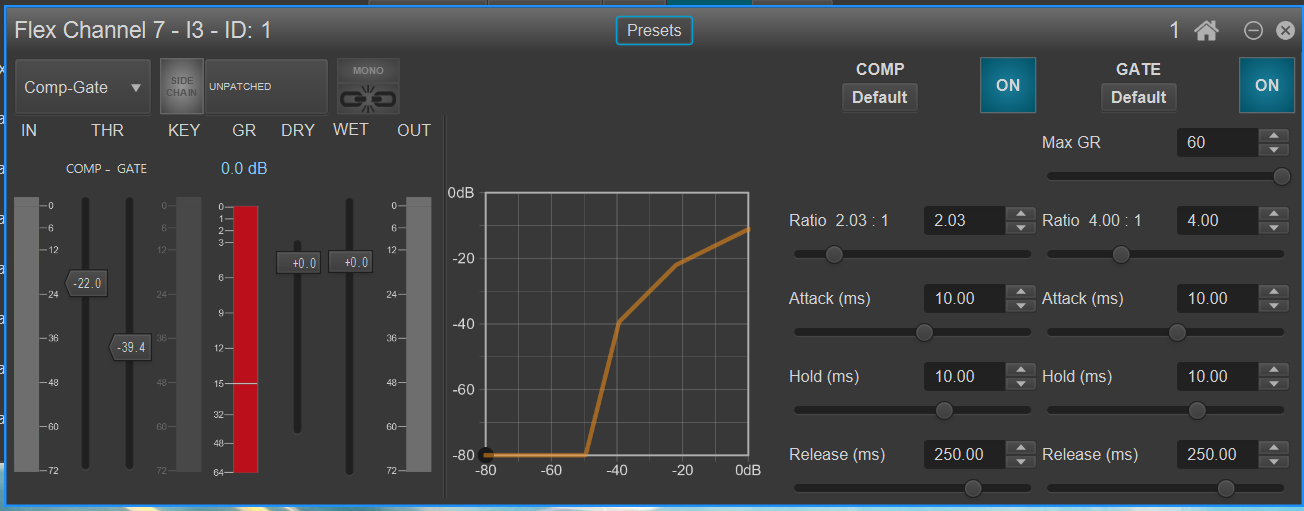
The processor can be configured to operate in four modes: compressor/gate, limiter/gate, upward & downward compressor or a soft-knee gate. The upward/downward compressor features two thresholds, conventional downward compression being applied above the upper threshold and upward compression at an independent ratio below the lower threshold. This simulates the action of a “leveller”, where the output signal is maintained within upper and lower defined levels: it is also very effective in optimising tracks for playback on portable devices. Upward compression can help improve intelligibility when there is a high level of background noise.
The two dynamics sections each have the normal threshold, ratio, attack, hold and release controls. Meters are provided for input and output levels, and also gain reduction. Two dynamics sections may be linked for stereo operation. The sidechain may be triggered from an independent source if wished, allowing for the possibility of frequency-conscious keying if the source is derived post-EQ.
The dynamics section also supports parallel compression (also known as “New York compression”), whereby the wet (compressed) and dry (uncompressed) signals are mixed together in some proportion, delivering the increased “weight” and fullness” of the compressed signal, while retaining the original dynamic range.
Delay
32 delay blocks are available in PRODIGY, which may be freely assigned to any of the four processing slots in a Flex Channel, Summing Bus or MatMix Master. The maximum delay available is 1365.3 ms per block, and may be set from globcon in units of metres (or feet), or samples, if preferred. The delay time may be set by entering the value numerically, by up/down nudge buttons, or by using a fader. In the channel where the block is inserted, the time may be displayed in any of the three options.
globcon additionally displays any delay that has been applied to a group of which the channel containing the delay block is a member, as it is important for the engineer to know the total delay applied to the signal rather than the “local” delay.