
 Nixer Pro Audio – Great Listening Leads to Better Monitoring

A decent set of ears is probably a prerequisite for designing great audio monitoring products.
However, for the Nixer team, it’s not just about listening to their own products.
CEO Nick Fletcher said “Our products are used in production, for critical on-air applications, in theatres, at events and in facilities around the world. We are always pleased to hear how operators are using our products and it is often these conversations that result in improvements to existing functions or the addition of new ones.”
It is therefore no great surprise that Nixer Pro Audio has introduced a steady stream of new functions and upgrades to its flagship PD Dante portable and RD Dante installed Dante monitoring, which, incidentally, share a common touchscreen user interface.
Dante Network Routing and Connection Control
Whether you need to correct a routing error discovered during testing, add a new source to your monitoring selections or patch in a backup unit because the live one has gone AWOL, getting to a computer or laptop to set the necessary network routing is not always possible, convenient or the quickest solution.
Even if you brought the laptop with you.
With a PD Dante in your hand, those changes can be made directly and immediately using the PD Dante’s touchscreen.
It’s all in the… … … timing!
Processing and connection latency is an unavoidable inconvenience in every audio and video system. However, when that results in the audio leading the corresponding pictures in the monitoring, it’s an error that must be corrected so the monitoring system accurately reflects the relative timing of the monitored signals.
The PD Dante and RD Dante now include monitoring audio delay of up to 400msecs to compensate for the latencies introduced in, say, a multiviewer monitoring system, the vision processing or network connections and, of course, the display itself.
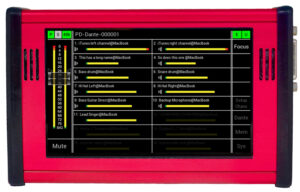
Adaptable 16 channel and 32 channel displays
The 16 and 32 channel displays receive a make-over with significant improvements to channel label and metering legibility.
- Extended, high resolution audio meters with improved response times and accuracy
- 32 character channel labels
- Adjustable channel label font size – 4 font size selections to give the best legibility
3rd Party Dante Device Control
Updates to the Dante device control from the PD/RD Dante touchscreen include editing of 3rd party Device Names and setting the Sample Rate. There has also been an increase in the number of controllable network Dante devices to 128.
You are Here!
When working in a crowded Dante network, being able to easily and quickly assign network sources to the touchscreen monitoring selectors of the device in your hands is essential.
Each PD or RD Dante now highlights the Home unit you’re holding, to speed up making those source-to-selector connections.
They are… There!
The introduction of the Identify function allows the activation of the Identify signal on individual Dante devices. This may be flashing front panel LEDs, signalling on front panel displays or, for those devices without either of those, steady flashing of the Ethernet connection activity LEDs.
Setting Just the Right Tone
 Test tones are an essential tool for system setup, signal tracing and fault-finding. Nixer has recently added the BLITS surround tone-set to the PD/RD Dante repertoire, which simplifies indentification of each channel in a surround stem, confirms that levels are set correctly and channels are correctly routed and time-aligned.
Also added in this update are sinewave tone bursts, with control over the repeat period and the mark:space or on:off ratio between tone and silence. Tone bursts are a useful aid to testing, measuring or correcting elements such as device latency, system time-alignment or things like dynamics attack and release times.
Listen-up Over There!
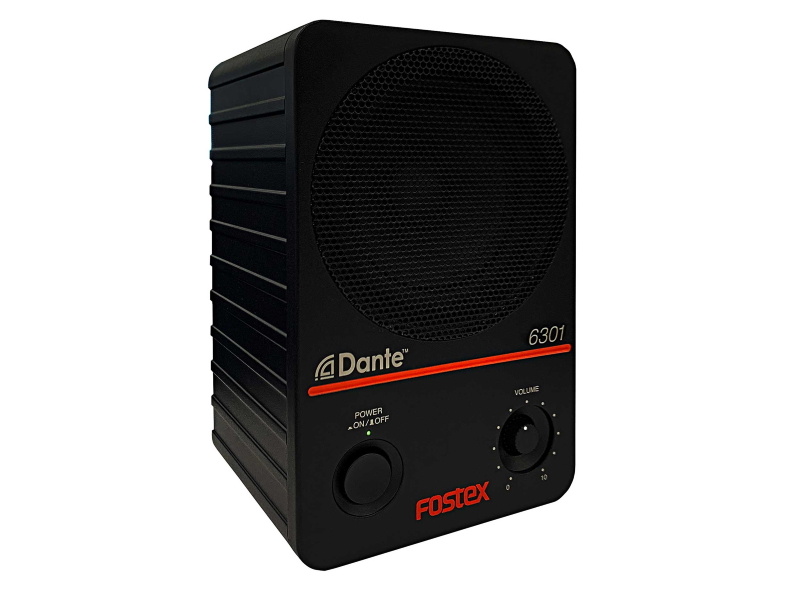 While the primary function of the PD and RD Dante is the selection of network audio sources to the onboard speakers, locally connected headphones or speakers, the PD Dante and RD Dante can equally make monitoring-source selections for remote external devices or speakers connected to the Dante network.
New Job, New Set-up
No event or production lasts for ever and the turn-around between jobs is getting tighter. The newly introduced Factory Defaults clears all the settings to their out-of-the-box defaults to simplify configuration for the next production, providing total confidence that there’s not a hidden setting that’s going to mess with hitting your on-air deadlines or add complications during opening-night.
Nick Fletcher sent an open invitation “… just drop us or your local Nixer distributor/dealer a line if you have a suggestion for a new tool, how a current function could be improved, or if you think we might assist on a current or pending project, be it Dante, Ravenna, AES67 or ST 2110!”
Download
Download version 3 for the PD Dante and RD Dante firmware here: https://www.nixerproaudio.com/Downloads/


